
In the Original App from «that place I worked at», users had two familiar ways to filter information: Excel filters and Advanced filters. When we moved to AG Grid, one of the big wins was bringing Advanced filters into the grids. Excel filters, however, did not make the cut at first as they had a history of performance problems in Protein and were difficult to implement safely in That New App.
With large data sets, these filters could take ages to load all available options, and in Amino the technical rule became clear: Excel filters can only work reliably when the grid has 1,000 records or fewer.
We started by having Column and Advanced Filters available at all times in the app, as before having ag-grid users were already used to having column filters. So, the decision was to allow for both, letting users select their preferred filter option by screen.
After a while a lot of users started to ask for the Excel filters back. Mostly to be able to have the multiselect option.
On one side, we are being asked to add the Excel filters while maintaining the other filter options. As every user might want to work with something different. And on the other hand, we are asked by developers to only allow the use of these filters when there are only 1000 records or less.
This is a great example of how to keep adding all the available options or saying yes to everything customers ask for brings trouble and confusion. At least when trying to grow it without a modular plan.
We already have three filter systems competing for attention inside the grid. The challenge is that one of them (Excel Filters) only works when the record count is under 1000. So users can use it… until suddenly they can’t.
As usual, after evaluating the problem multiple times, we get to the point where we need to review the complete interaction of the filters in the screen (see “Hierarchy of Filters’ evaluation” for that journey). You won’t let me lie, as it commonly happens in the industry, “…it’s good to know we have a bigger problem, but we need the Excel filters NOW…”
So. Let’s review the options we have available to solve this problem as best as possible with the time frame, dev analysis and constrains we may encounter.
Problem definition
First Problem:
First problem: we already have two filter types inside the grid. Adding a third one means we also need to explain when it can and cannot be used, because Excel filters depend on the number of records the grid is handling.
Design review:
- Who is asking for this?
- Mostly Original App users that are aware of the existence of this type of filters and want them back.
- This is what we call a “feature parity”. A lot of users are asking for features that they were used to working with in the Original App (fair).
- Why are users asking for this filter type?
- Normal phrases: “We need it”, “I can’t work without it.”
- «My workflow has muscle memory, and your new workflow has offended it.»
- Resistance to change
- What are they missing?
- They are looking for the option to have a selector of all the available options. This allows multiselect with the option to add operators, like “contains” “exclude” etc.
- They are easy to access and already known by them.
- Do we really need to add them?
- I believe most of these needs can technically be handled with the current filter options. The problem is not only capability; it is familiarity, speed, and trust. Users do not want to interrupt their workflow to translate what they already know into a different filter type.
- Example of a bigger and different problem
- Yes, we need to add them because important clients are asking for them, and realistically, Sales and Product are not going to say no to a request that is tied to feature parity and adoption.
- Do we need to keep the other filter types?
- Negative evidence says:
- Existing filters can already solve many cases.
- Additional complexity increases the onboarding difficulty.
- Technical limitations exist.
- Positive evidence says:
- Clients are under the impression they will be unable to work if they don’t have them.
- Feature parity expectations.
- Familiar workflows.
- Conclusion
- Yes, important clients want them, and Sales and Product will not say no.
How to solve it?
At first, the solution sounds simple: keep the grids starting with the original column filters, then allow users to switch filter types from the “more” option inside the grid. This keeps the default experience familiar while still giving users access to Excel filters when the grid can support them.
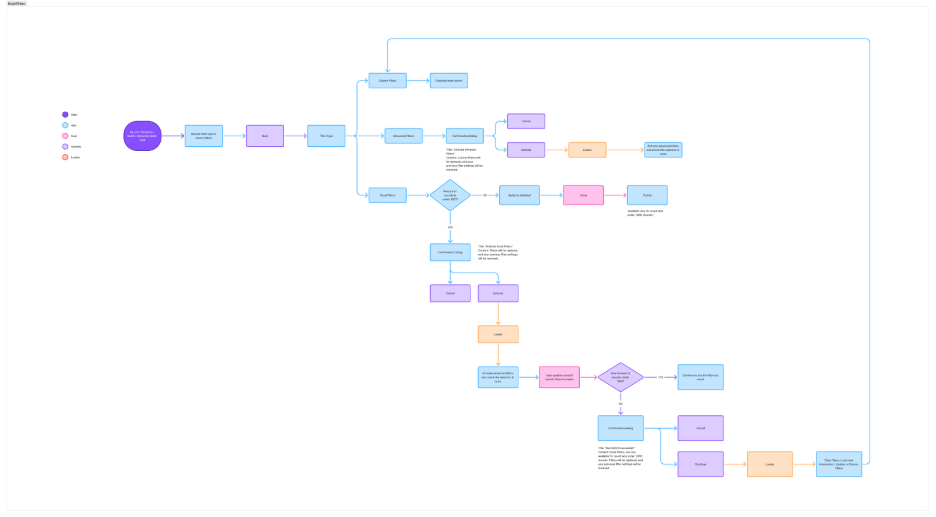
We already have a similar workflow when working with the advance filters. We allow them to find them in the same space. Once they try and switch, we give a warning about deleting their current filters and then switch.
If there are more than a thousand records on the grid, then the option is disabled. If they try to switch to it, there will be a tooltip allowing the users to know the rule “This option is only available under 1000 records”.
Now…
Second Problem:
We have screen filters. Not only screen filters, but a Search Bar and probably a date picker somewhere.
This means a user can switch to Excel filters while the grid has fewer than 1,000 records, then change a screen filter, search term, or date range and suddenly push the result set over the limit. The filter was valid one second ago, and now the system has to decide what to do with it.
Before choosing a solution, I wanted to evaluate the options through two lenses: what would be least painful for users, and what would be realistic for development.
Shall we:
- Block any movement and let them know they should switch to a different filter type or reduce their search until they hit the thousand mark.
- Give them a warning about switching to a different filter type of what will imply and do it for them.
- Confirmation dialog, “Do you want to switch? You will lose your active filters”.
- Load up to 1000 records and give them a warning that they are not seeing their complete information because of the filter selection.
- Do a mix of the filters they want into the column filters.
All of these options have their own challenges to actually add to the application. Some may not work at all, and some will bring more problems to users that never even asked for this option there in the first place.
And my main concern, we are making every development challenge the user’s problem for wanting this filter option.
UX Evaluation
I created an emotion map to evaluate our solutions. I mixed with the development complexity on our side to figure out the best option.
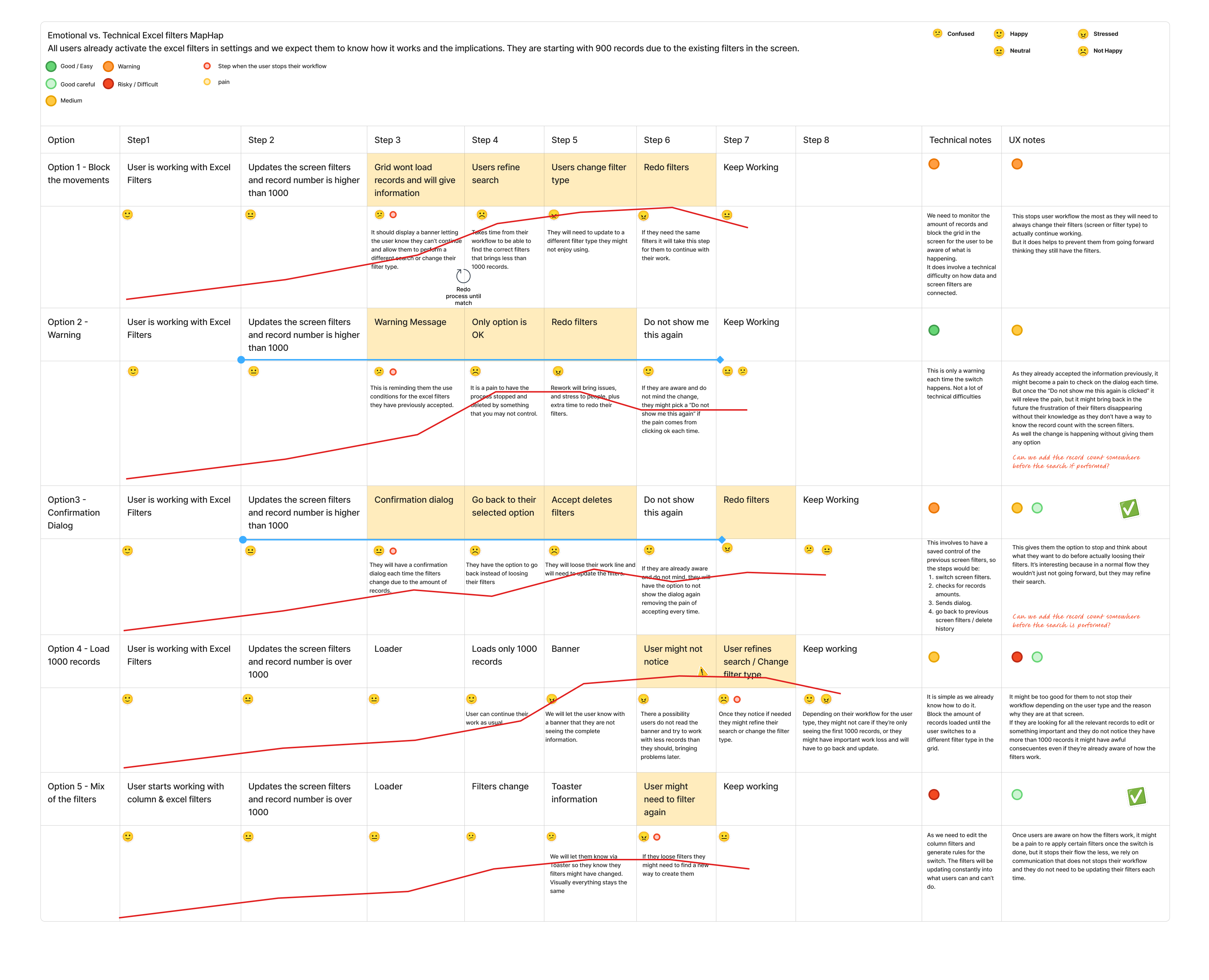
The red line represent the amount of stress user’s might be having while trying to work with the filters, givig us a comparison with the technical difficulties to try and find the best option to use.
Based on this exercise I chose 2 options:
- Confirmation dialog
- Mix of the filters
On the UX side it is better to go for the mix of the filters, as it stops the user less, and won’t need for them to go to the more menu to be able to continue working. Is faster, with less clicks and works with the previously agreement when activating the filters.
If the complexity is too much for our time frame, the easiest and lest risky solution would be to just ask each time if they’re certain they want to continue. It does bring a complex tech situation as we need to save the screen filters information until the user confirms or deny’s what they want to do.
Funny thing, it does bring us to a further problem: What if they get the dialog and whatever happens and they log out from the app? (Maybe the internet connection was lost and they need to refresh). In what step of the process shall we bring them back? will they loose all their previous filters? etc.
As this is being implemented, once user research is made I will bring you more information on how they’re handling the change. But this is a great example on how a small user request might bring out so many issues that we have. Including even design debt that was ignored up to this point.
How long will they keep pushing the actual issues in the application with the promise to all the users to just give them what they want? – As a designer, when do you stop or step up to solve the actual problem everyone is trying to ignore from the beginning of time?
I personally work on them on my free time (at work) and have it ready for when they want to implement it. Every auditory brings new reports and new updates to the app that will not necessarily enter the next release, or ever at all.
Designing is always a challenge when we are in the industry, followed by time frames and technical issues.

